
Best Startup Loan Calculators Compared: Top Tools for Accurate Payment Estimates

High borrowing costs can choke a young company. Bank loans now run 6–11 percent, and many online lenders charge even more, according to NerdWallet’s 2026 rate tracker. Borrow the wrong amount at the wrong rate and cash can vanish before revenue lands.
Startup loan calculators put you back in control. Enter the loan size, term, and APR, and the tool instantly returns your monthly payment, total interest, and real cost of capital—no surprises.
In this guide we compare eight standout calculators, show you how to stress-test each scenario, and answer the most common founder questions so you can pick debt that fuels growth rather than hinders it.
Why accurate loan calculations matter for startups
Most young companies operate on a razor-thin cash cushion. One slow sales month or one oversized loan payment and the runway shrinks fast.
Cash-flow pressure is the top reason businesses fold. Eighty-two percent of small firms fail because they run out of cash, not customers (SCORE). When you see that figure, it becomes clear that survival often comes down to simple math.
A loan calculator brings that math forward. Enter a realistic rate, term, and amount, and the tool shows the payment that will hit your account every month. No surprise balloon payments. No hidden fees.
Take a $50,000 loan for 5 years. At a 10 percent APR, the monthly payment is roughly $1,060. Raise the rate to 15 percent and the payment climbs to about $1,190. That extra $130 per month adds up to nearly $7,600 in additional interest over the life of the loan. Small change, big cost.
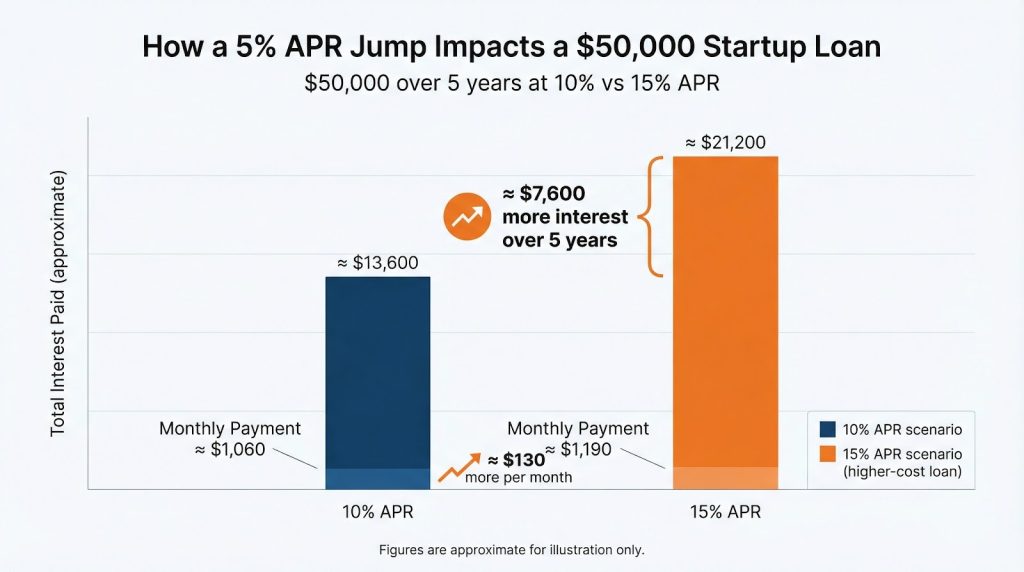
Because rates remain elevated after the recent hiking cycle, start with a worst-case rate, then model a best-case scenario. Those two guardrails keep financing from choking growth.
Lendio’s free startup loan calculator illustrates this transparency nicely—it updates the payment in real time as you drag a slider for rate or term.
Its January 2026 rate guide lists average APRs of 10–27 percent for term loans and 9.75–13.25 percent for SBA financing, giving you a realistic ceiling when you stress-test a worst-case scenario.
Because the tool doesn’t ask for an email first, you can jump between best-case and worst-case numbers in seconds and leave with no marketing spam.
A five-minute calculation today can save months of scrambling for cash tomorrow.
What to look for in a startup loan calculator
Not every calculator deserves a spot in your bookmarks. The best tools share traits that turn quick math into reliable insight.
First, they let you adjust every variable—rate, term, payment frequency, and one-time fees. The more inputs you can modify, the closer the output mirrors a real loan offer.
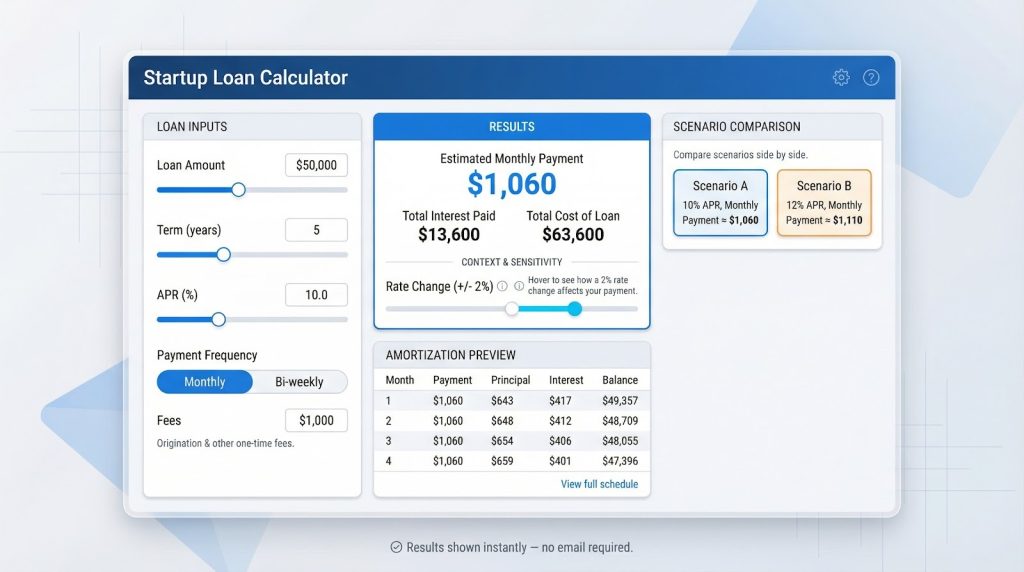
Second, the results go deeper than a single payment. A quality calculator provides a full amortization schedule so you see interest and principal for each month of the term.
Third, you need built-in context. Clear definitions beside every field and a slider that shows how a 2-percentage-point rate change reshapes the payment help you learn while you calculate.
Fourth, look for comparison features. Some calculators let you stack two scenarios side by side or link to marketplace quotes, speeding up the affordability check.
Finally, protect your inbox. Top-tier sites give answers with no sign-up required. If a tool demands contact details before showing results, skip it.
Top tools for accurate startup loan payment estimates
1. Lendio: best for multiple loan types and lender matching
Lendio’s calculator hub offers sliders for term loans, equipment financing, and dedicated startup loans. Its loans calculator updates the payment in real time and surfaces total repayment, effective APR, and a full amortization schedule so you grasp the true cost before you borrow. Because Lendio connects to more than 75 lenders, the tool can translate your inputs into live offers without a full application. Run a second loan type, compare the figures, and confirm which structure fits your budget.
Lendio startup loan calculator interface with sliders and real-time payment estimate.
2. Bankrate: best for detailed amortization
Enter amount, rate, and term, then select Calculate. You receive the monthly payment, total interest, and a full amortization table that shows principal and interest each month. You can switch payment frequency to bi-weekly or add an extra payment field to see how faster repayment trims interest.
Bankrate business loan calculator with detailed amortization schedule.
3. QuickBooks: best for comparing multiple scenarios
Enter one loan’s details and click Add another. A second set of fields appears, letting you compare two payments side by side. You can see which option drains more cash each month and which costs more interest over time. The page is free to use even if you do not subscribe to QuickBooks.
QuickBooks small business loan calculator showing side-by-side scenario comparison.
4. Calculator.net: best for detailed customization
Here you can set compounding frequency, choose payment intervals, and include origination fees. The output shows an effective APR and produces an amortization table you can export to Excel—useful when a lender quote includes daily compounding or uncommon fee structures.
Pro tips for using loan calculators effectively
Begin with the highest rate you think a lender might quote. If the payment still fits your budget at that figure, any lower offer becomes a bonus.
Model two or three scenarios consecutively. Keep the amount and term the same, and change only the interest rate. This reveals how sensitive your cash flow is to a single rate shift.
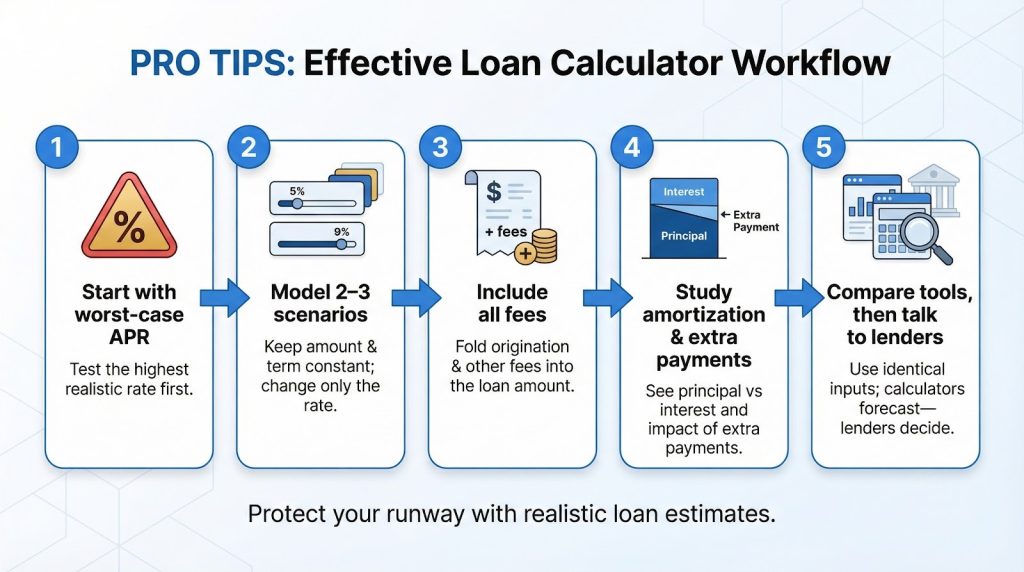
Include all fees. If the calculator lacks a fee field, add the dollars to the loan amount before you click Calculate. Doing so converts a headline rate into a realistic all-in APR.
Study the amortization schedule when it is available. Notice how slowly principal falls in the early months. If the loan allows prepayment without penalty, an extra payment once in a while can trim years off the term and thousands off interest.
Keep inputs consistent when you compare tools. Enter identical figures in Bankrate, Lendio, and NerdWallet. Matching outputs confirm each site follows the standard formula, while discrepancies highlight hidden assumptions or rounding quirks.
Remember, calculators forecast; lenders decide. Use the figures to set limits, then negotiate with clarity and confidence.