
Slides to video: repurpose decks for buyer questions
Slides to video works best as an editing task: choose one buyer question, select the slides that answer it, and write the explanation a viewer needs without the original presenter. The result should stand on its own and lead to a next step that fits the question.
A marketing team may already have the material in a webinar deck, sales presentation or product briefing. The challenge is deciding what belongs in the new video. A slide that worked halfway through a live conversation may make little sense to someone arriving from an email.
Which slides to video projects are worth making?
Start with a question sales or support already hears, then check whether the deck contains enough evidence to answer it. “Product overview” is a broad topic; “What happens to an existing approval process?” gives the editor a decision to explain.
A useful source slide has a concrete example, a clear diagram or a claim you can support. Remove the meeting agenda, speaker biography and references that depend on an earlier session. Keep the fuller presentation available for readers who need background.
Build a small map before producing anything:
Buyer question | Material to keep | Possible next step |
How does this work? | One process diagram with explanation | Read the implementation guide |
Will it fit our workflow? | Relevant configuration example | Review the requirements |
What would our team need to do? | Responsibilities and dependencies | Discuss an implementation plan |
These are editorial examples, not a required funnel. The next step should follow from what the video establishes. A basic explanation does not automatically justify a request for a sales meeting.
How should you rewrite a presentation for an absent viewer?
Replace the live presenter’s missing context with a short, explicit explanation. Every reference to “this,” “here” or “what we discussed” needs something the viewer can actually identify.
Imagine a software presentation showing an approval diagram. The live presenter might know that a manager joins the process only for certain requests. If the new narration says every request needs a manager, the video has changed the meaning even though the diagram looks familiar.
Keep the condition with the claim. A result from one customer should still identify the relevant situation; a chart should retain its period, units and source. If the deck contains an old product capability or price, check it against the current approved material before narrating it. Shortening the presentation must not hide when its evidence applies.
Read the script while looking at the intended visual. If the voice explains a setting that appears in tiny text at the edge, enlarge the relevant area or simplify the slide. Ask a colleague who missed the presentation to describe the main point before you approve the sequence.
Where does an AI presentation tool help?
It helps assemble a narrated draft after the audience and message are clear. The marketer still needs to decide which evidence belongs in that draft and whether its explanation is accurate.
For teams working from a PPTX, Leadde.ai can turn slides into a video through Slide Presenter. Its documented workflow includes script options, presenter and layout choices, preview, and MP4 output. Treat the generated explanation as an editable draft. The product page says original PowerPoint animations and transitions are not preserved, so inspect any slide whose meaning depends on a staged reveal.
The import dialog examined for this guide included an Audience field alongside script options. For the approval example, a useful brief would be “operations managers comparing this process with their existing approval chain.” The editor still needs to check whether the generated explanation answers that brief. The observed settings alone do not demonstrate a finished video’s quality.
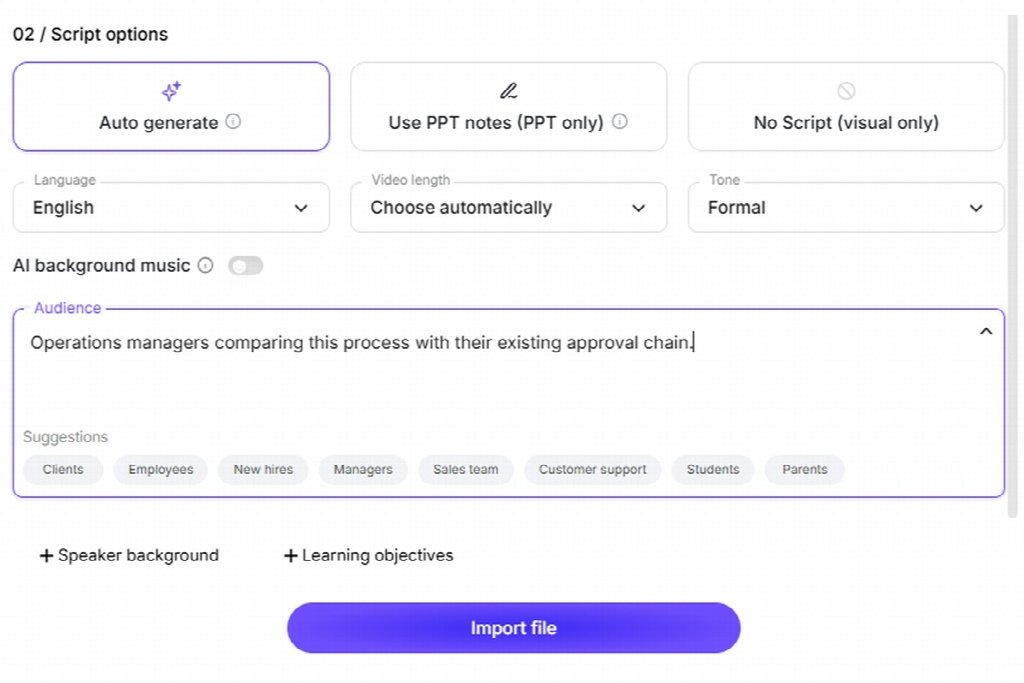
The audience brief names the viewer and the question. It is input for a sample deck, not a finished marketing video.
Separate changes to the message from changes to the visual treatment. Approve the claim and its wording first, then check the presenter placement and slide readability. Otherwise a reviewer can spend time debating a layout while the video still answers the wrong question.
How should you distribute the new video?
Place it where the buyer is already asking the question. A workflow explanation belongs beside the relevant help or product page; a response to a webinar question can fit a follow-up email.
Name the video for its answer rather than the event where its slides originated. “How an approval request reaches the right manager” tells someone what they will get. “September product webinar excerpt” mainly describes your filing system.
There is a reason to plan for viewers who arrive later. ON24’s 2026 webinar benchmark summary reports that 52% of attendees in its global 2025 data watched on demand. That is evidence about ON24’s webinar audience, not a forecast for a short marketing clip, but it supports treating later viewing as a deliberate use case.
Keep the page or email introduction consistent with the video’s first claim. A subject line promising implementation steps should not lead to an introduction dominated by company history. Test the destination link along with the video itself, using the access permissions of an intended viewer.
What should you measure beyond play counts?
Measure whether viewers reach the explanation and take the next step the video was designed to support. A play count shows activity, but it cannot establish that a buyer’s question was answered.
Wistia defines engagement rate as the average proportion of a video watched. Its 2026 State of Video findings explain why a shorter video can have a higher engagement rate while a longer one still earns more total viewing time. Match the measure to the purpose instead of treating completion percentage as the only goal.
For an implementation clip, track visits to the requirements page as well as viewing. Define that event before publishing and distinguish it from a video play. For a follow-up asset, ask sales whether it helps answer the specific question it covers.
Compare versions within the same channel and with similar audiences. A sales email to interested prospects and a broad social post start with different levels of intent. A change in their results cannot, by itself, prove that one edit is better. Keep the audience, distribution dates and video version beside the results.
Questions before publishing
Should every webinar produce several videos?
Only if it contains several useful, self-contained answers. Check that each proposed video has distinct evidence and a different question. If two outlines use the same explanation, combine them before production.
Should you replace an existing webinar recording?
Keep it when the discussion and audience questions add value. A new slide-based explanation serves a different entry point. Start with one buyer question, check the supporting material and decide what useful action would show that the answer helped.
Start from the buyer concern, then choose supporting evidence and a useful follow-up.